
Every ELXR game, installed and kept up to date
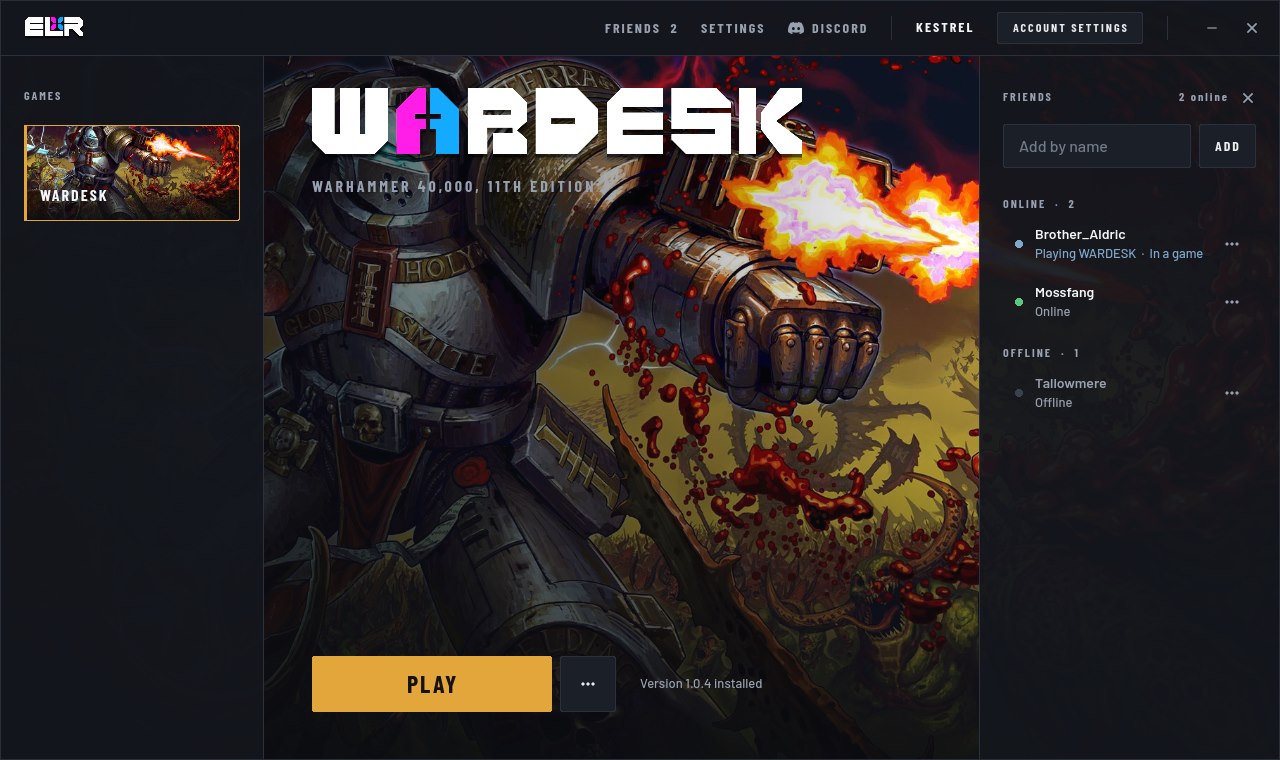
ELXR is a small Windows app. It downloads our games, patches them in the background and starts them already signed in.
Nothing here installs or signs in. Open a game, a friend's chat, Settings or the menus
Trailer
One app in place of a 3.5 GB download
We built ELXR so players never have to fetch a whole game again to get a fix. It is the only way our games are installed, and it stays out of the way once they are.
- Small patchesA game is stored in pieces, and an update only fetches the pieces that changed. The last WARDESK patch was 40 MB of a 3.5 GB game.
- Updates itselfELXR checks for new versions every two minutes, of the games and of itself, and installs them while you do something else.
- One sign-inSign in once in ELXR. Each game starts already signed in to the same account.
- FriendsSee who is online and what they are playing, and add friends by name, without opening a game.
- Your connection, your callCap the download speed, pause downloads while a game is running, and repair an install without downloading it all again.
- Sits in the trayClose it and it keeps your games current from the system tray. It can start with Windows if you want it to.
Games on ELXR
One so far, for Windows.

Warhammer 40,000, 11th edition, on a 3D table. Quick Play, Ranked, tournaments and games against the computer.
Out now · Free until 13 December · Patch notes
Installing takes about a minute
- Download and run ELXR.exeWindows may say it doesn't recognise the app. Choose More info, then Run anyway.
- It installs itselfELXR copies itself into place and adds a desktop and Start menu shortcut. There is no setup wizard.
- Sign in and pick a gameCreate an account or sign in, press Install, and play when the bar fills.
On Linux? Download ELXR for Linux, unpack it and run ELXR.x86_64. It adds itself to your applications menu. Needs a 64-bit PC with Vulkan drivers.
Need help or want a game? Join the WARDESK Discord